


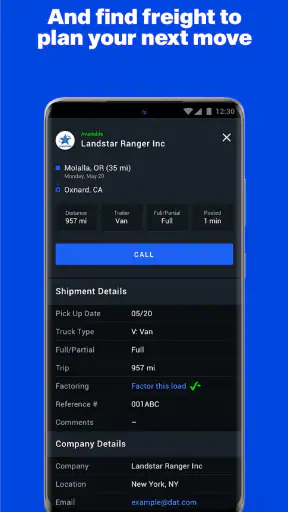
I approached Dat One: Truck Load Board as a working tool rather than a casual business app. It is built for people who need to look for freight, compare lane information, and check rates while making practical decisions during the day. That focus is immediately clear: this is not a general business planner or a simple contact list, but a specialized load-board app from DAT Solutions for the trucking side of the industry.
My first impression was that its value depends less on flashy presentation and more on how consistently it can fit into a dispatcher’s or carrier’s routine. If you already understand terms such as lanes, equipment, pickup windows, and rate checking, the app gives you a mobile way to continue that work away from a desk. If you are completely new to freight, it may feel dense until you learn how the different pieces of a load search connect.
How I would use Dat One during a normal workday
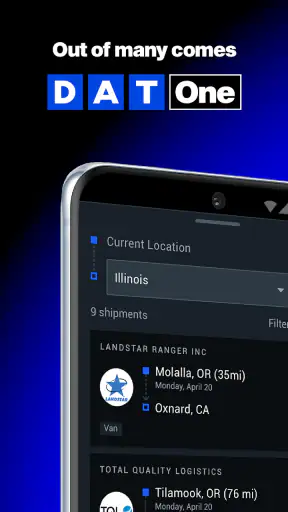
The most sensible starting point is a simple search habit. I would begin with the origin and destination that matter for the next available move, then narrow the results according to the equipment and timing I can actually support. The important point is to search with a real operating plan instead of browsing every possible load. A broad search can create noise, while a focused one helps me judge whether a load fits the truck’s position and the driver’s schedule.
A realistic example would be a carrier finishing a delivery outside a major freight area and trying to avoid an empty return. I would open the app, search the nearby origin, inspect lanes heading toward the driver’s preferred region, and use the freight-rate information as a reference before calling or messaging a broker through the normal business process. The app does not replace that conversation. It helps me decide which opportunities deserve my attention first.
That distinction matters. A load board is most useful when it supports a decision, not when it becomes a stream of listings that I check without a plan. I found the strongest workflow to be: establish the truck’s actual position, define the acceptable destination, compare the available lanes, and then verify the practical details before committing. Keeping those steps in that order reduces the temptation to choose a load only because it looks attractive at first glance.
The app’s business category makes sense because the work is operational and time-sensitive. A small carrier can use it to keep an eye on opportunities between calls, while a dispatcher may use it as one part of a larger desk-based process. I would not treat it as a complete transportation-management system. Its role is narrower and clearer: help me find loads, examine freight-rate context, and think through lanes from a mobile device.
For a new user, I recommend spending the first session learning the vocabulary and search flow instead of immediately trying to optimize every result. Notice which fields change the usefulness of a search and which ones merely make the list look more specific. The fastest users are not necessarily the people who open the most results; they are the people who know what makes a result actionable for their particular truck.
Settings that deserve attention before serious searching
Experienced use begins with checking the search settings carefully. I would review the origin area, destination preferences, equipment requirements, and timing details before relying on a result. A small mismatch in any of these can make a load appear relevant when it is not practical. This is especially important when a driver is already committed to a route and cannot freely reposition.
I also recommend treating location as a working constraint rather than a suggestion. Searching from an overly wide area may show more possibilities, but it can hide the cost of reaching the pickup. Searching too narrowly can make the market look empty when a nearby freight area would be reasonable. I would run a tight search first, then widen it deliberately only when the truck’s fuel, time, and repositioning options justify doing so.
The same principle applies to destination. A carrier that needs to reach a particular region should not judge a load solely by its first leg. The better question is whether the destination leaves the truck in a useful place for the next move. I like to compare the immediate rate discussion with the likely follow-up search, because a load that pays well on paper may create a difficult next day if it ends in a location with fewer suitable options.
Rate information should also be read as context, not as an automatic promise. I would use it to identify whether a quoted offer deserves a closer conversation, then account for deadhead, tolls, fuel, loading delays, and the driver’s available hours. The app can help frame the negotiation, but it cannot make the business decision for me. That is one of the most important habits to develop with any freight-rate tool.
Another useful adjustment is to keep the search aligned with the truck’s real equipment. Looking at every possible result may feel productive, but it wastes time if the trailer or operating setup cannot handle the freight. A disciplined search produces fewer distractions and makes it easier to compare similar opportunities. This is a small change, yet it has a noticeable effect when the app is being checked repeatedly throughout the day.
Because the application is free, it is easy to install and test without adding a purchase decision to the process. It is rated for Everyone, and it supports devices running Android seven or later. I still would not confuse easy access with effortless use: the professional value comes from understanding freight operations, not from simply having the app on a phone.
Faster patterns for dispatchers and independent carriers
My preferred speed improvement is to create a repeatable search sequence. I would use the same order every time: current truck location, realistic pickup range, acceptable destination, equipment fit, timing, and rate context. Repeating that sequence reduces mental switching and makes it easier to notice when a promising load fails one of the basic checks.
It also helps to separate discovery from evaluation. During a quick check, I would collect only a few plausible lanes rather than deeply studying every listing. Later, when I have the necessary details, I would compare those candidates by total movement and operational fit. This two-pass approach is more useful than making a full decision while distracted at a fuel stop or between phone calls.
Another practical habit is to search around the driver’s next known endpoint before the current load is finished. I would not wait until unloading is complete if the schedule is predictable. Starting early gives me time to compare alternatives and spot whether the next move is likely to require a wider search. It also prevents the common mistake of accepting the first available option simply because the truck is already empty.
For a small fleet, I would keep the app’s search work tied to a shared dispatch routine. One person can identify promising lanes, while another confirms the truck’s hours, equipment, and delivery commitments. The app itself is not a substitute for that coordination. Its strength is giving the team a common place to inspect freight opportunities, while the final decision still depends on accurate information from the people managing the truck.
I would also avoid treating a high rate as the only shortcut worth taking. A slightly lower offer with a better destination, shorter deadhead, or more dependable schedule can be the stronger move. The useful comparison is not just rate against rate; it is the likely result after the full trip and the next positioning decision. This is where the app becomes more valuable to an experienced user than to someone who only scans for the biggest number.
When I am checking the app repeatedly, I would make a note of the search conditions that produced useful results. Not every day has the same freight pattern, but remembering which origin radius, destination direction, and equipment filters worked recently can make the next search more deliberate. I would still recheck everything rather than assuming yesterday’s approach will fit today’s truck.
Where the mobile approach reaches its limits
The biggest limitation is that a phone-based load board cannot remove the complexity of freight work. A listing may look suitable and still require careful confirmation of pickup timing, commodity details, appointment expectations, broker communication, and payment terms. I would never accept a load based only on a quick glance at the app. It is a screening and planning tool, not a replacement for due diligence.
The screen size can also become a practical constraint when comparing many possibilities. On a mobile device, I prefer short review sessions with a clear question in mind. If I need to compare a large set of lanes, organize extensive notes, or coordinate several trucks at once, a desktop workflow may be more comfortable. The app is strongest when mobility matters, not when the task demands a wide operational dashboard.
There is also a learning curve for people who do not already know how trucking decisions are made. A new owner-operator may understand the basic idea of finding freight but still struggle to judge whether a lane is profitable after repositioning and operating costs. I would recommend using the app alongside advice from an experienced dispatcher or carrier rather than assuming the displayed rate answers every financial question.
Another trade-off is speed versus verification. The app can help me find a promising opportunity quickly, but moving quickly increases the risk of overlooking a detail. My solution is to use a fixed confirmation checklist outside the initial search: exact pickup and delivery information, timing, equipment suitability, distance to pickup, and the effect on the next load. That extra discipline is not unnecessary bureaucracy; it is what keeps a fast search from becoming an expensive mistake.
For the same reason, this is not the right choice for someone looking for a general business app, an invoicing tool, or a complete fleet-management platform. A person who only needs simple scheduling may find a broader productivity app easier. A larger operation that needs extensive reporting and centralized workflow may prefer a desktop transportation system as its primary tool, using a mobile load board only for quick checks.
What the adoption numbers suggest, and what they do not change
DAT Solutions has built an app that clearly attracts a substantial trucking audience: Dat One has more than a million installs, with an average rating of 3.9 from around four thousand ratings and roughly a thousand written reviews. I see that as evidence that the concept is useful to many working users, but not as a reason to ignore the friction that some people may experience. A load board can be valuable and still demand patience, careful filtering, and industry knowledge.
The app was released in late June of 2020 and is currently listed as version 1.86.0.2155. Those details matter mainly because mobile business tools change over time, and a user should keep the installed version current when possible. I would also check that the phone meets the Android requirement before planning a workflow around it. The free price makes experimentation straightforward, especially for an independent carrier deciding whether a mobile search tool fits daily operations.
On iOS or Android, my recommendation would remain the same: judge it by the quality of the routine it enables, not by the number of searches performed. If it helps me identify viable lanes faster and prepare better questions for a broker, it is doing its job. If I am opening it without knowing the truck’s constraints, it will probably create more noise than clarity.
My verdict after building a repeatable routine
Dat One: Truck Load Board makes the most sense for independent drivers, small carriers, and dispatchers who need mobile access to freight opportunities and lane-rate context. I like it because it supports a real workflow: search from the truck’s position, narrow the movement, compare practical options, and use the result to guide the next business conversation. The free entry point also makes it easier to test without committing money first.
Its best users will be deliberate. They will check settings, search with a destination strategy, account for deadhead, and verify the details before accepting anything. They will also understand that a displayed opportunity is only the beginning of the decision. Those habits turn the app from a scrolling list into a useful part of dispatch work.
I would be more cautious recommending it to a complete beginner who expects the app to explain profitability or manage every part of a trucking business. I would also point larger fleets toward a broader desktop system if they need deep coordination and reporting. In those situations, this app may still be a helpful companion, but it should not be the whole operation.
My honest recommendation is to try it if your daily work involves finding freight and evaluating lanes from the road. Give yourself time to establish a consistent search pattern, then compare the results with the realities of fuel, time, equipment, and the next destination. Used that way, Dat One: Truck Load Board is a practical mobile business tool with clear value, provided you bring the operational judgment that freight decisions still require.


